
If you have ever searched for 'remove background from image free', you likely ended up at a site that let you process one image before asking you to create an account, buy credits, or upgrade to a premium tier. Sites like Remove.bg or Canva are incredible tools, but they almost always charge for high-resolution downloads. Why? Because they rely on server-side Artificial Intelligence.
Every time you upload an image to an AI-powered background remover, the image is sent to a remote server. A complex neural network (typically based on a U-Net architecture) analyses the image, predicts which pixels belong to the foreground subject, and sends the masked image back to you. Running these massive neural networks requires expensive GPU servers. Those server costs are passed directly to you.
But what if you don't actually need AI for your image? What if there is a faster, entirely free, and completely private way to do it?
The Technical Difference: AI Segmentation vs. Browser-Based Alpha Masking
There are two fundamentally different technical approaches to removing backgrounds: AI Segmentation and Alpha Masking.
AI Segmentation (The Server Approach)
AI segmentation models are trained on millions of images. When they see a photo of a dog in a park, they recognize the concept of a 'dog' and can trace around its fur, even if the fur colour is very similar to the grass behind it. This semantic understanding makes AI incredibly powerful for messy, complex photographs.
- •Pros: Incredible edge detection for complex subjects like frizzy hair or transparent objects.
- •Cons: Requires uploading your image to a third-party server (privacy risk), takes time (latency), and costs the provider money (which is why you pay for high-res downloads).
Browser-Based Alpha Masking (Our Approach)
Browser-based alpha masking works differently. Instead of relying on a neural network to 'understand' what the object is, it relies on mathematical colour distance. Using the HTML5 Canvas API and WebGL, the tool selects a target background colour (usually determined by clicking or by corner sampling) and removes all connected pixels that fall within a specific colour tolerance threshold.
- •Pros: Runs 100% locally on your device's CPU/GPU. Zero latency, zero server costs, and complete privacy since your image never leaves your computer. This makes it completely free.
- •Cons: Struggles if the background colour is identical to the foreground subject (e.g., a white cat on a white snowy background).
When to use which approach
You should use a premium AI tool when you have a highly complex photograph with poor lighting, blurry edges, or a subject that blends directly into a chaotic background.
You should use a browser-based alpha masking tool like AlteredIdea's Background Remover when:
- •You are working with product photography (which typically has solid or contrasting backgrounds).
- •You need to remove the background from logos, illustrations, or vector graphics.
- •You are dealing with confidential documents or personal photos that you do not want to upload to a random server.
- •You need a high-resolution transparent PNG instantly, without paying or creating an account.
How to remove a background for free using AlteredIdea
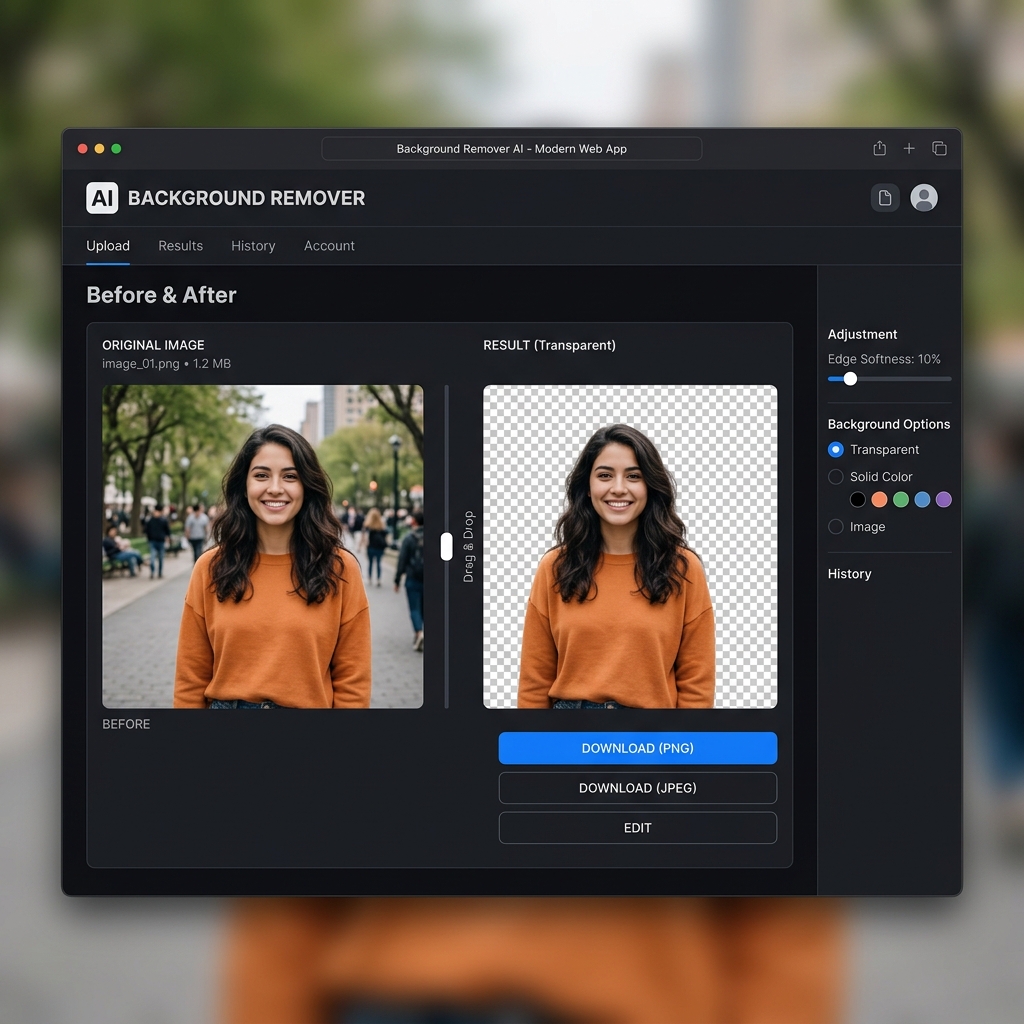
Our Background Remover tool was built specifically to solve the 'freemium trap'. It uses your own device's hardware to process the image instantly.
- 1.Navigate to the Background Remover tool on AlteredIdea.
- 2.Drag and drop your image directly into the browser window. (Remember, it doesn't upload anywhere!).
- 3.The tool will automatically detect the dominant background colour and mask it out.
- 4.Use the 'Edge Softness' adjustment slider to refine the cutout. A higher softness helps blend anti-aliased edges.
- 5.Select your desired output: Transparent (PNG), or a Solid Color background (JPEG).
- 6.Click Download to instantly save your full-resolution image.
The Privacy Advantage
In an era where every piece of uploaded data is potentially used to train future AI models, processing images locally offers a significant advantage. Whether you are a designer working on unreleased product mockups, or just someone cleaning up a personal photo, keeping your files on your own device is the only way to guarantee absolute privacy.
Next time you need to make an image transparent, try the local, browser-based approach first. For the vast majority of day-to-day graphic tasks, it is the fastest, safest, and most cost-effective method available.
Try AlteredIdea's Background Remover today. It runs entirely in your browser using local alpha masking, meaning zero uploads, zero privacy risks, and unlimited free high-resolution downloads.